Showing posts with label ssas. Show all posts

Thursday, January 21, 2010

Changing all-name in dimension

When working with cubes and dimensions and you have a dimension with time for example, you have the value "All" default added. "All"means that you select all occurrences in the time dimension, selecting the measures over all time.

When you create reports using cubes, this all-value is default added to the report as well. So when you create a parameter, "All" is included in the dropdownbox:
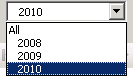


To support your users, "all" is not the best discription that can be added. A better option would be "all time", or "last 5 year" (depending on the horizon of your dimension).

To change this default behavour, go to your cubedesgin and go to the properties of your dimension. Then change the field AttributeAllMemberName to the disired name:
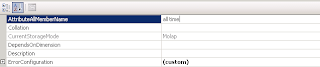


Leaving it blank will default add "all". Changing the property will add your given name as all-value.

Wednesday, January 20, 2010

How to automatic process SSAS Cubes

After building a cube in SSAS and its released for production, its time to automate the processing. Unless you like pushed the same button every monday ;)

To create an automatic scheduling, you have two options:
  • Using SSIS
  • Using XML script

SSIS
Using the integrated services methode, we first need to create an integrated services project. After that, we need to create a connection to our AS database.


Then add an analysis services processing task. This a default task to process your cubes and dimensions.


Now pay attention: Process your dimensions first, else you could end up with key conflicts. The task doesn't process automaticly the dimensions first and then the cube. It does this in random order.

This means you have to add a second analysis services processing task. The first one only for the dimensions, and the secondone for the cube:


Now build the project and add it to your sql agent as a job.

XML scripts
The script method is pretty easy, but less flexible. Go to the database you want processed. Rightclick and select process. Then in the topleftcorner you see an option script to clipboard.


Then create a job in the agent and add a step SSAS command. Add your ssas servername and paste the xml script into the editbox.

Schedule and save the step and your done.